Voter ID Apply Online: Introduction
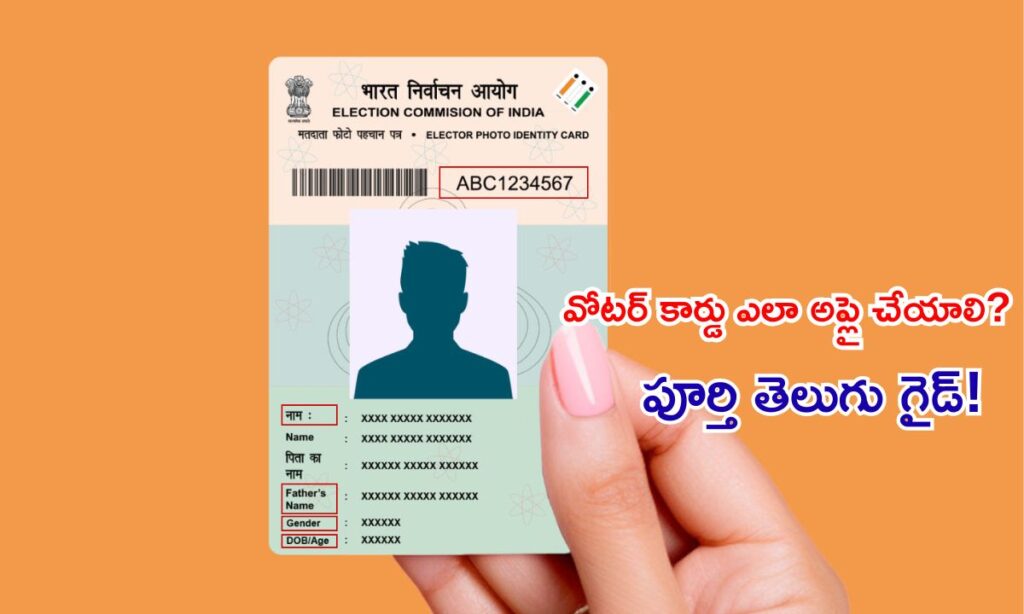
Voter ID Card (EPIC – Electors Photo Identity Card) India lo prathi nagariku oka powerful identity proof.
Voting kosam matrame kaadu, ID proof, address proof, government verifications, jobs, SIM card — chala chotla use avuthundi.
E rojullo Voter ID apply cheadam, correction cheyadam, status check cheyadam digital India vallaa chala easy ayyindi. NVSP (National Voters Service Portal) and Voter Helpline App use chesi, manam 10 minutes lo online lo application submit cheyachu.
Ikkada mee kosam complete Voter ID guide simple Teluginglish lo prepare chesanu.
Why Voter ID is Important?
. Election lo vote ivvadam
. Strong identity proof
. Address proof (banks, schools, offices)
. Passport, driving license verifications
. Government schemes ki required
. SIM card, bank account opening lo use
18+ ayyaka immediate ga Voter ID apply cheyadam very important.
Voter ID Apply Eligibility
- Age: 18 years complete aiyundali
- Indian Citizen
- Same location lo residence proof vundali
- Duplicate voter entry undakudadhu
Required Documents for Voter ID
Identity Proof:
- Aadhaar Card
- Passport
- PAN Card
Address Proof:
- Electricity Bill
- Water Bill
- Rental Agreement
- Ration Card
Age Proof (18+)
- Birth Certificate
- 10th Certificate
- Aadhaar
- Passport-size photo
Read this also : Ayushman Bharat Health Card Apply Online 2025 – Full Guide, Eligibility, Benefits
How to Apply Voter ID Online (Form 6) : Voter ID Apply Online
(NEW Voter Registration Guide)
Step 1: Visit NVSP Portal
Step 2: Login / Register
. Mobile number enter cheyyi
. OTP verify cheyyi
. Account create avuthundi
Step 3: Select “Form 6 – New Voter Registration”
Step 4: Fill Personal Details
- .Name
- DOB
- Gender
- Address
- Family details

Step 5: Upload Documents
- Photo
- Proof of age
- Proof of address
Step 6: Submit Application
Application number generate avuthundi.
Step 7: Track Status
Same portal / Voter Helpline App lo status check cheyyachu:
- Submitted
- Under Verification
- Accepted / Rejected
Step 8: Voter ID Delivery
- Digital Voter ID (e-EPIC) – instant download
- Physical card – 15–30 days lo mee address ki post
Voter ID Correction (Form 8) – Online Process : Voter ID Apply Online
Voter ID lo spelling mistake, address change, DOB correction aina, Form-8 use cheyyali.
Correction Steps:
- NVSP portal open
- Login
- “Form 8 – Correction / Update” select
- Only required details update cheyyi
- Documents upload
- Submit & track status
Corrected Voter ID paper card mee address ki postal lo vastundi.
Digital version immediate ga available untundi.
Voter ID Address Change (Inter-State / Same City)
Migration or shifting aina, Form-8 or Form-6B use chestaru.
- Within City → Form 8 (Address Update)
- State Change → Form 6 (New Registration with relocation info)
How to Download Digital Voter ID (e-EPIC)
Digital version e-EPIC (PDF file) phones lo carry chesukovachu.
Steps:
- NVSP website open
- Login
- “Download e-EPIC” option click
- EPIC number enter
- OTP verify
- PDF download avuthundi
Digital voter ID valid & acceptable everywhere.
Read this also : PAN Card Apply Online & Correction 2025 – Step-by-Step Guide, Documents
Common Mistakes to Avoid
- Wrong DOB
- Aadhaar mismatch
- Incorrect address
- Double registration
- Photo unclear upload
Government verification lo delay kakunda undadaniki, accurate details enter cheyyandi.
Conclusion
E-simple steps follow ayite, Voter ID apply / correction process 10 minutes lo complete avuthundi. NVSP portal vallaa waiting lines, offline registration hassles anni reduce ayyayi.
Mee identity strengthen chesukodaniki, election lo participate cheyadaniki Voter ID card must